Sunday, 21 April 2013

Phones for Seniors


As we age, our bodies start to do things that we would rather they didn't. One such thing is there is a natural loss in hearing and visual acuity. People can become hard of hearing or require glasses to correct sight difficulties. Studies also suggest that mental functioning is also slowed down, thereby making it harder to retain and process new information. In other words, as we age we rely on our past experience to assist us in the future.


With all the changes that the digital revolution has spawned it is little wonder that many people, irrelevant of age, find technology daunting. The decision to engage digitally is being forced upon the UK by Government using online forms and information in preference to the printed word, thereby excluding anyone who is not computer literate.

I will leave computers to a further post, and concentrate this one on mobile phones.

The land line is all but dead. Most young people have a mobile phone and a contract with a network provider, which they change regularly along with getting a new phone. Research suggests older people are less likely to engage in mobile communication and when they do they tend to stick with the network provider and phone for considerably longer than young people.

Thus for the older person who wants to enter the mobile marketplace what are the options?

I would suggest there are three options:
1) a simple very cheap phone to make and receive calls on and nothing more.
2) an easy to use phone, which is specifically designed for older or disabled people.
3) a smartphone.

Let's consider the merit of each.

1) The simple phone (feature phones)

There are a range of simple phones which allow the user to make and receive calls. Some have Internet access and most will provide a simple SMS (text) service. There could even be a camera or fm radio facility with the phone but these are often tokenistic gestures and are of poor quality. The simple phone is ideal for people with excellent sight, excellent hearing and who are able to learn the relatively poor menu system that most have.  The menu system is one where it is easy to get lost and be unsure how to get out of the maze of menus. Screens accordingly can be poor and ringtone limited. You get what you pay for.

The Nokia 100 a simple mobile phone with no frills but a good price tag.

2) the Easy to Use Phone

Easy to use phones are not new but they can be hard to track down and even harder to test prior to purchase. In my two ebooks (Easy to use mobile phones and A guide to buying a mobile phone for the over 50's) I outline the key characteristics of an easy to use phone. This category is slowly growing in popularity and supermarkets are now beginning to stock some easy to use phones.

Essentially, easy to use phones have louder ring tones, increased volume, larger font sizes and better contrast. Some suffer from the difficult menu syndrome but most have the main things to use easily accessible for the user. Some easy to use phones have emergency buttons to allow the user to call for assistance in an emergency.  Some companies to consider looking out for are Alcatel, emporia, Doro, but a good selection are reviewed by Which? here, although it is difficult to argue they are all easy to use.

 The emporia ELEGANCEplus easy to use phone


The simplest easy to use phone is being marketed by AgeUK in their shops.  It is called the My Phone and looks like a brightly coloured credit card.  You can buy this phone and it allows the use to store only a preset number of your nearest and dearest on it and can emboss their names on it.  You press on the name and it dials the number. Clearly a phone like this is not suitable for the majority of the people in the world and might only be suited to those with cognitive impairments, but as it is so small I suspect it will be lost before it is ever used.  Sadly no voice mail feature, no caller recognition features to allow the user to see who is calling and a design that might look funky bad is hardly useable for people with dexterity issues or hearing problems.

AgeUK’s myphone

If you have hearing, sight or cognitive processing difficulties then an easy to use mobile phone might solve you communication problems.  This is especially the case as Doro have started to bring out a smartphone specifically for the older generation.  Although this may not compete with some of the top smartphones it might be worth investigating.

 The Doro 740 “Smartphone”

3) the Smartphone

Smartphones have been around for many years.  The iPhone is possibly the most famous of the bread.  Within smartphones there are a number of platforms that the phone can work on and these are iOS (Apples mobile platform); Windows mobile (Windows platform); Android (Google’s platform); Blackberry (the Blackberry platform) and Firefox (Mozzilla’s new platform).  Each has merits but if the search includes accessibility features and add-ons such as apps to personalise your mobile experience then iOs and Android are the ones to head towards at the moment as both have a range of accessibility additions you can use.

Ultimately, the question comes down to what do you want to do with your phone?

If you want to make calls and receive them and send the off SMS text to someone then a simple phone or an easy to use phone might be just what you are looking for, but increasingly people want more for their money and they want more from their mobile.  Thus if you want to watch movies, take good photos, do Internet chat sessions, browse the Web, play games, keep share documents up to date, use cloud services, complete online forms in on your phone, then you have to look for a smartphone or a tablet.
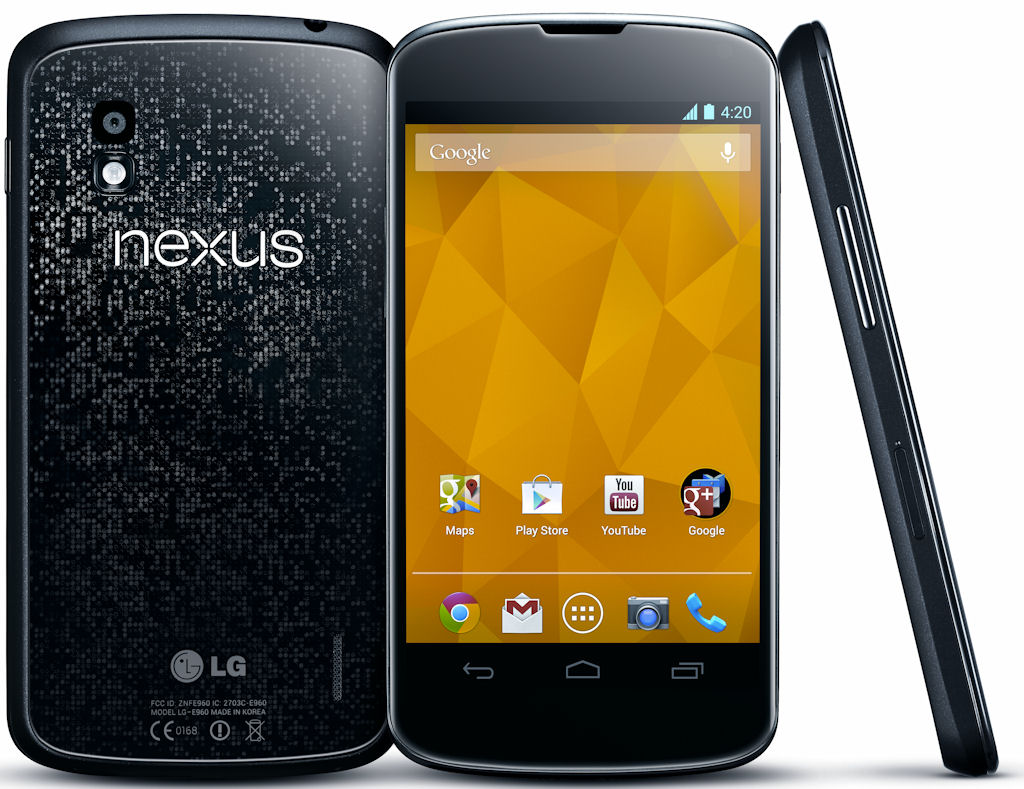

The nexus 4 runs the latest version of Android


Smartphones have progressed so that it is easy to understand the basics of how you interact with them.  Certainly Android has made leaps in this direction and has increasingly made the phone more user friendly.  Like anything, you have to learn the basics, but with iOS and Android the learning curve is less and things become intuitive quite simply. 


Sunday, 14 April 2013

Google Music: the vegetarian alternative to consuming Apple’s


Google Music logo from Android Spin http://androidspin.com/wp-content/uploads/2012/01/Google-Music.jpg

If you are trying to decide which music player to purchase, give some thought to Google Music.  Ok, so it is yet another music player, do we not have enough choice with iTunes and all the other nefarious players out there, I hear you say?

If, like me, you run predominantly Windows and Android devices, apart from an Apple iOS iPod, then you will often come up against the problem that if you need to use iTunes. When iTunes was first released it was revolutionary, and a landmark program, that enabled users to upload their whole music catalogue and store it on their chosen computer for downloading to an iPod or mp3 player.  It was brilliant because you could also upload covers for the music and create playlists etc.  iTunes is possibly one of the reasons for the iPods success at conquering the personal audio marketplace.  Thus people started to move from defunct Vinyl and CDs and start to store music virtually. With the developments in computing such as the cloud and mobile computing digital music is now the norm.

Every computer comes with some form of digital media player on it as part of the software but often an alternative is best.  For me as a Windows user, the alternative I have always used is MediaMonkey which does everything iTunes does, and more, including converting music formats and downloading artwork and autotagging (metadata such as song, artist, album, genre etc.) details.  As music collections increase in size, most music devices are a little cranky due to the size of the database they are using to keep the details of your music together.  Both iTunes and MediaMonkey tend to collapse if you have more than a few Gigabytes of music stored on your hard drive.

I was therefore really interested in the new Google Music platform. Like Apple’s iCloud, Google Music uploads your music (up to 20,000 songs) to the cloud.  This is a great way of backing up your music.  If for no other reason having your music collection backed up is worth the charge of the programme, but it is available for free. 

So let’s concentrate on Google Music and see what it really is. 

Google Music is a free programme, which you can download and run on Windows computers, it is working on a version for iOS devices, but currently is limited to Android and Windows devices. Download Google music from Google Play for the Android devices and for the PC download it from here.  The PC link also offers music uploads facilities for Mac and Linux users, so everyone can upload.

It is easy to play a song from a stored mp3 file

Google Music allows you access to your music through the app and on the Internet, so your music is always available. Having installed the app on a mobile device and/or a computer you can let the device upload the music you own to its virtual stores.  This is free but does consume bandwidth and takes time. I have been uploading my collection for some time now and it has hardly made a dent in it, but once the upload to the Google Music store is complete I will not need to reupload the songs again, ever.  More importantly they are stored for life, attached to me and my Google id. 

I found that in order to reserve some bandwidth on my computer and not allow Google Music to completely monopolise the Internet and computer resources in uploading the music I had to fiddle with the options and change the upload speed to “Medium” otherwise Google will use almost all of it.  Changing the bandwidth is simply achieved by right clicking on the headphone icon in the taskbar – option – Advanced tab – Bandwidth available for uploading drop down menu. Uploading at maximum capacity can be great when you are in bed and asleep, but not when you have deadlines to meet on a computer or want to use if for something else like writing this.  

Having uploaded your music it is now available to you on any device you are logged into.

You can even find your next track whilst listening to something else easily

So my initial impressions of how it performs are that it is great, in fact even better than great. 

It works via the cloud so there are limited resources being used on your computer/mobile device required to play your music.  Most importantly, wherever I am my music collection, and I mean all my must collection is available to be played. I can make playlists of songs I like at the moment and even download songs I want to listen to all the time by a long press on the track. 

By Clicking on the head[hone in the top left, you can choose the type of list you want to be shown.

 Some of the initial things I have spotted which I am certain will be cleared up in due course are firstly, that if I have not tagged a song correctly, or the tag has become corrupted then it is stored permanently as this incorrectly assigned track.  This could be very annoying in time.  

Secondly, you cannot reupload the music you have deleted from the store. 

Thirdly, in terms of privacy, you are providing Google with all the music you have downloaded and there are a number of privacy issues that you might want to think about before you do this, such as what are they going to do with this information? Are you Google advertisements going to be tailored to your music tastes? I think this is especially the case with people who already use predominantly Google products.  On the other hand Apple have all this information about you already, so perhaps this is evening things out.  Also it is your choice to use the service. 

Fourthly, bandwidth is a real issue with any streaming service and it is especially important that your network provider allows unlimited use and will not cap your service by you listening to your music.

Negatives aside, I amazed I can stream my own music through all my devices without needing to take up storage space on the phone unless I want to listen to them offline.  Google also convert each track to 320kbps making the sound quality better than a CD, but again means large bandwith issues if you have a poor internet connection. Google also can make suggestions of music I might like which could be interesting and helpful or ridiculous if anything like Amazon's suggestions. 

Locating tracks is not difficult as Google’s search does that for you.  So if I plan another trip to India, instead of taking a Walkman with a few tracks on it, I can take every piece of music I own in the Google virtual cloud.  Most importantly, I can access my music easily and quickly.  

If like me you have spent many days of you life transferring CDs to mp3 format then this is the option you have always wanted. This is the missing step that Apple failed to deliver on.  Google Music a lightweight web-based programme interface running as a browser in the background of my pc and a light app running on the Android devices I have.  I look forward to the official iOS version of the app.  

To me the positives outweigh the negatives.

So would I recommend it?  Certainly.

With Twitter announcing its music app and other social media hubs jumping on the music cloud it will be interesting who actually comes out on top and whether Apple still retain their crown. To me, Apple’s iTunes is the shiny fruit that comes beautifully packaged but does get a bit boring over time.  Google on the other hand is more like a potato, a trusted vegetable that is adaptable and versatile and tastes great.  But I do not recommend frying your iPod just yet.

Monday, 5 November 2012

Does size Matter?


It might sound a bit of a cliché but does size really matter?

I think it might.

As I have reached my 50th year,  I have found that my eyes have deteriorated as a result of poor screen pixelation on computers and poor refresh rates causing eye fatigue, headaches and sight difficulties.  Such is the life for many people who spend much of their life in front of a computer screen.

I notice that the font size is critical to me; if it is too small then I have to change to my reading glasses. Too small is defined as the size of font size currently used on many pre-packaged ready meals.  This means I either have poorly cooked food or have to put on my reading spectacles.

On a computer or mobile device the font size is extremely important.  For many smartphones there are apps that can be downloaded to change the font size but few are absolutely ideal and most will change the font of some items whilst leaving others at their originally small size.   

The smartphone and tablet computer tend to mitigate this problem by the use of icons, so the user does not need to read the name of a programme, they just click on the icon.  Pictures are often easier to recognize and have greater utility than just words but when in an app such as notepad the user must fiddle with the settings to change the font.  Most games do not allow for font change making them a little difficult to play on a smart phone.  Similarly texts are often unable to be read easily unless a text font modifying app is installed.

Size is also important in relation to the size of the screen; bigger screen better font is usually the case.

The iPad and iPad mini

The Samsung Galaxy S3  and S3 mini

The iPhone 4 and iPhone 5


The most important size though is the size of the device itself. The mini iPad for example has been criticised as it is more difficult to pocket than its 7 inch counterpart the Google Nexus 7.  The Samsung Galaxy S3 and the iPhone 5 are substantially bigger than their previous incarnations, this has caused Samsung to rethink the S3 and bring out the S3 mini, similar phone but smaller.  

Depending on what you want to do with your phone the size of the device matters. 

If you just want to receive calls and make them, then the device needs to be big enough for the numbers to be visible that are being dialled.  If texting is a priority then the screen needs to be bigger but small enough for thumbs to glide effortlessly around a keypad. If the phone is smarter and the user wants to play games on it, then it needs to be bigger still; and if the person wants to use the phone as a photographic studio to edit and take photos it should be even bigger.

Mobile devices can be too big and cumbersome. Many tablets are very portable but not suitable for one handed use for long periods as they are a little too heavy for most people. Similarly, large screen mobile phones are great but can be a privacy issue as if the screen is too big, allowing others to see the content as well as the user.

It is interesting to note that most easy to use phones have large screens and large fonts but the phones themselves are largely quite small. So this is acknowledged as an issue of importance but one that many smartphone manufacturers have not heeded.

So the $64 million question is what is the best size? 
or
Is their and ideal size?

What size is best?

Tuesday, 2 October 2012

Computing today and the challenges of tomorrow


When I was growing up, computers were being invented. I recall my brother getting his first calculator, which was made by Casio and could add, subtract, multiply and divide to fifteen decimal places.  It was a large fat device and the buttons were very dodgy and kept misreading the touches.  It was fantastic for showing off with, it could do pi (π) to fifteen places, which was the sort of thing that people in the playground would think of as cool, in some schools.

The Casio Calculator


My first experience with a computer was at university, where we had to log in via DOS and use DOS commands to do simple functions.  These were basically used as calculators for large sums.  I will always recall the dread of the “\CD” “C>” prompts, which at the time seemed be some sort of Masonic code to people like me who were more concerned with humans that computers.  The computer screen was a cathode ray tube and provided a black screen with small white/grey writing on it when you typed.  I also recall some using early rudimentary word processing packages that allowed you to type something and then print it. 

Floppy disks were huge and bigger than the 7” single we all possessed.  They were fragile and easily broken or corrupted. They fitted snugly into the post box like slot in the computer and made various crunching noises as their whirred around.  This means I have witnessed and used a range of floppy discs from the 8-inch, through the 5 1⁄4-inch, to the 3 1⁄2-inch floppy disks and now the flash drives and other media formats.

Floppy Disks


The computer screens changed from black and white to green and black and then eventually black and white pictures were produced which were followed shortly after by their colour compatriots.

The computer itself changed colour from grey to black to white and now can be obtained in many colours.   The once huge computer, which was a mainframe, changed to being portable and then a laptop, netbook and currently a tablet computer or phablet.   

The internet when it arrived was obtained via a wire and called the Ethernet; this then became a 14-54kb mobile data/fax modem that everyone at the time used. This allowed pages to load before your eyes. Line by line, the page would slowly come into view.  Web pages were designed to be small and light, so they could load quickly.   I recall when I started doing my first web pages back in the 1980’s, I would send the URL of the page to a site that would tell me how fast the page would load.   This also meant that a good web page would load fast and have few pictures on the page. The current wireless modems and superfast 3g or 4g speeds of today not only download web pages in fractions of a second. Wireless connectivity has freed the computer from the ties of cables and extensive battery life allows greater flexibility.

A network terminal with two floppy disk slots


Today, your computer can download movies or play games wirelessly anywhere where there is a wireless network point.

What does the future hold for computing?

It seems there are some interesting challenges ahead. The ubiquitous computer provides the ability to embed computing into everyday objects, so the social world can be more accessible. The use of voice recognition provides greater flexibility for devices, but no one wants to constantly chattering to the ether. Similarly, virtual technology and 3/4g provide excellent opportunities for communication and gaming, but virtualisation has it's own limits. There is a optimum for sized devices and although different devices might have different size requirements, for different functions but there will be an optimum size derived eventually. Ideally, on one the one hand it would be ideal to have technology that reads thought commands, this could also be extremely problematic or even dangerous in certain circumstances.

So the challenges are becoming apparent, they centre on improving technology from a person- centred perspective. The challenge is to find out what people want and need from technology, and delivering just that, no less and no more.  

I would also suggest that part of this challenge is to provide an off switch so the always on society can also be the sometimes off.  Privacy and security are to be more of an issue the more things are networked together.

As we invest more of our future technology, reliability and survivability are also critical elements. Technology should not fail and if it does systems should be in place to ensure that data survives.

Some of today's wireless technologies


Battery power is also the issue for the mobile user, especially owners of smartphones and tablet computers who are forced to charge their devices daily. We are increasingly becoming tied to power points to charge our phones, laptops, tablets, MP3 players etc.

As technology becomes more embedded in everyday objects we will also see the increase in need for more reliable battery power or the ability to recharge as the battery is used.

The future is a mass of possibilities, like the missions to space, the Universe seemed within our grasp, and technology offers the potential for considerable good as well as possible doomsday scenarios. We need to encourage the good and hinder the bad.

Most importantly it is important to recognise that the current improvements made by technology are temporary and the equilibrium or normality of service will be reinstated eventually. This will inevitably involve a considerable amount of technology, but this should be technology that supports us, not technology that we are supporting.

Controlling technology or being controlled?